Campus Resources
Showing 10 of 57 Results

E-Resources Digest

07/31/2025
profile-icon Erika Boardman

File:SAGE Publishing logo 2023.svg - Wikimedia Commons


Sage Business Cases is a digital collection that provides access to THOUSANDS of business cases from over 100 countries! The collection covers emerging and underserved topics, representing a diverse and global business environment, to demonstrate how theories can be applied practically in real organizations.

You can browse Business Cases in a variety of ways:

  • Discipline allows you to pick a field of your choice such as Accounting, Leadership, Strategic Management, etc. to discover cases relevant to your research and desired field.
  • Sage Originals are curated Case groups commissioned, developed and published by Sage! These cases include additional content such as teaching notes, discussions questions and learning objectives. Some of the categories available include Global Marketing, Immigrant Entrepreneurs, and Events Management.
  • Enhanced Cases are business cases that include data, video, teaching tools and audio materials to enhance your learning experience. 

You can also browse by Region, where you can select a specific country, and you can scroll through a list of Content Partners in case you’d like to review business cases created by a specific organization.

Explore this resource more and reach out to our Business Librarian, Angel Truesdale, for any questions! 


This digital collection provides faculty, students, and researchers with unlimited access to thousands of authoritative business cases from over 100 countries, covering hot business topics and emerging industries.
 
decorative-image
07/23/2025
profile-icon Erika Boardman
Check out Ovid MEDLINE and EmCare to enhance your healthcare and nursing research!
decorative-image
07/10/2025
profile-icon Erika Boardman

Coming July 2nd, an upgraded user interface is coming to our EBSCOhost content!

The interface has been redesigned in response to user research, usability studies, and customer feedback. This upgrade features a modern look with enhanced functionality and improvements to the platform's accessibility. The platform also comes with new intuitive features that will assist and enhance your research experience. 

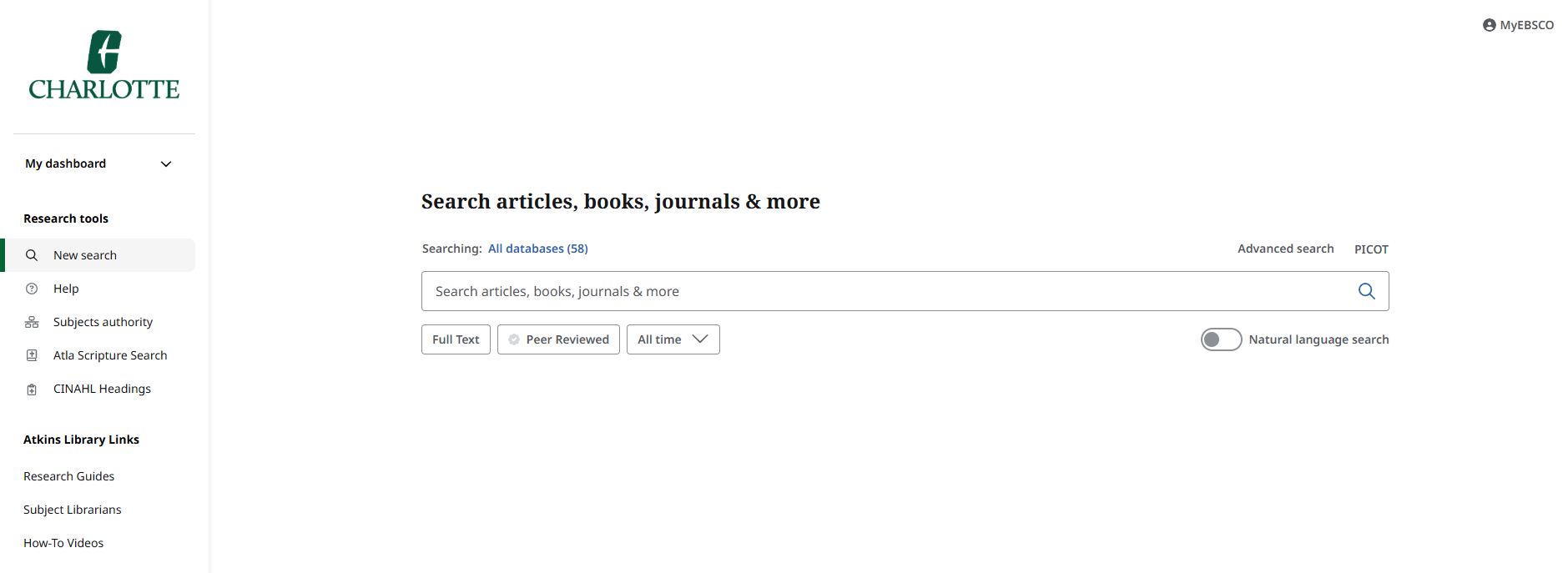
Here is a preview of the new interface: 

EBSCOhost's new user interface basic search page


While there are many exciting enhancements coming to the display and usability of our EBSCO products, we want to make sure you are prepared for a few changes made to the interface. 

Here are some notable changes to be aware of:

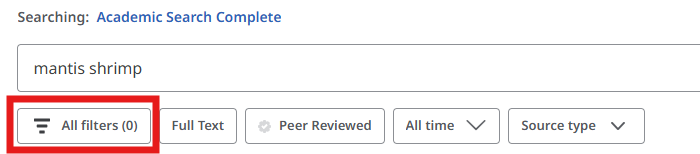
  • Filters - After searching for content, Filters are no longer appearing on the side of the page. Instead, an All Filters button will display directly below the search bar for you to click and see all of the available filters.


The All Filters button is .located below the main search bar


  • Saved Searches - Saved Searches will migrate over once you log into the new user interface with your personal EBSCO account credentials. They will appear under Saved and a tab will display for Searches. Please be aware that it may take longer for your content to migrate over if you have a lot of saved content. 
     
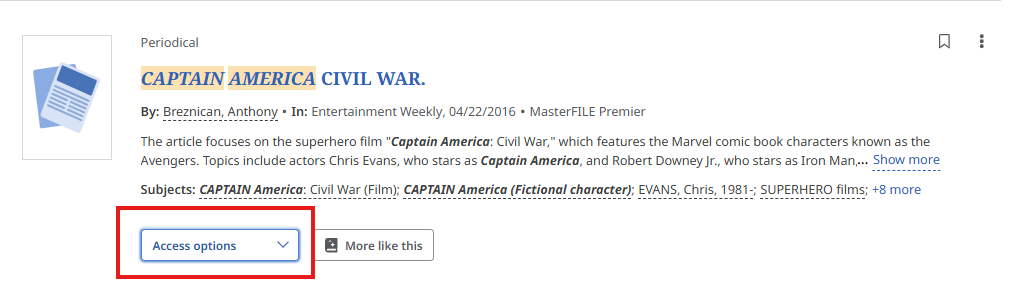
  • Access Options - When there are multiple formats available for content, an Access Options button menu will appear for you to select your preferred access method:
Access options allow you to pick your preferred format, such as a PDF or to access the content in the browser.


  • Folders - Folders are now called “Projects” and will appear on the left-hand side under the new personalized My Dashboard menu

    There are some items that will not migrate over into the new interface and will need to be recreated on the new interface. This includes:
    • Items saved in your Custom or Shared folders
    • Companies
    • Webpages
    • Journal Alerts
    • Search Alerts
    • Persistent Link to Searches
    • Notes
    • Pages
    • Other content sources
       

If you have any questions, are experiencing a technical issue, or would like to share feedback on the new user interface, please contact your Subject Librarian

No Subjects
decorative-image
07/10/2025
profile-icon Erika Boardman
NAACP Papers and Black Freedom Struggle in the 20th Century
decorative-image
07/10/2025
profile-icon Erika Boardman
Check out some of our books from the Self-Care Collection!
news bank access world news. reliable information on almost any topic
07/10/2025
profile-icon Erika Boardman
Check out these resources recommended for you by our Head of Research Services, Garrison Libby!
No Subjects
01/12/2024
profile-icon Erika Boardman


A graphic saying new e resource.

Health and Psychosocial Instruments (HaPI) is an essential database that provides in-depth information about behavioral measurement tools across a variety of disciplines, including medicine, nursing, public health, psychology, social work, sociology, communication, and organizational behavior.

With HaPI, you’ll find detailed records describing a variety of different types of measurement instruments that will help enhance the quality, reliability, and validity of your behavioral research. The database covers coding schemes, interview schedules, questionnaires, rating scales, checklists, and much more!

12/20/2023
profile-icon Erika Boardman

Social Explorer


Social Explorer provides access to thousands of data indicators across the social sciences and humanities, including demography, economy, crime and more. The user-friendly platform makes it easy for for students, faculty, and researchers to visualize a variety of data indicators for research projects and enhancing course curriculums. The datasets are already available to you in the form of Tables or ready-to-go maps, allowing you quick access to the data points you need for any location of interest.


Multidisciplinary Data Maps
Whether you're interested in discovering U.S. business patterns for a specific region, want to analyze COVID-19 data across different states, or want to know more about the unemployment rate across Asia, Social Explorer has a ton of data points available for you — including a data set focused on Ireland's religion and population from 1911 to 2001. 


Demographic Profiles
Aren't sure where to start with your project? Need to find more background information about a neighborhood?
Social Explorer offers a search engine to help you find the right information about your target community, and offers location suggestions to help get you started.


Training Modules & Course Support
While the platform is super easy to navigate, some of us may need a little extra help or want to do more in-depth research. Training modules are available to offer hands-on training on data categories, types of visualizations, using layers, and so on. Each module opens up to an example data set and gives you a step-by-step learning experience with the different mapping functions.

For our professors that are interested in integrating Social Explorer into their coursework, Social Explorer offers "Lecture Launchers" which are mini-modules that students can open and explore a specific dataset accompanied by prompted exercises and discussion questions. These are available for a handful of topics including psychology, political science, social work, etc. Each "Launcher" also specifies the knowledge level and the expected amount of time it takes for each one to be completed.


Want to learn more? Check out Social Explorer Now!

09/08/2023
profile-icon Erika Boardman

Swank Digital Campus


Swank Digital Campus provides access to streaming films that support instruction both in and outside of the classroom, and to promote active and engaged learning. Featuring a mix of classic flicks and popular favorites, our Swank collection includes course-assigned films and other hand-picked titles by our Film Studies librarian. Some recently available films include Get Out (2017), Moana (2016)Joker (2019), and The Wizard of Oz (1939). These films may switch out every now and again, so make sure you check out the titles that are now available from Swank — Be sure to select "Student" if you are prompted to choose a role.

You can also check out our Swank Film Library Collection!


If you're an instructor interested in using a streaming video for one of your courses, you can use our Electronic Course Material Request Form to let us know you're planning on using an existing film from our collection or to request we purchase one for you!

08/07/2023
profile-icon Erika Boardman


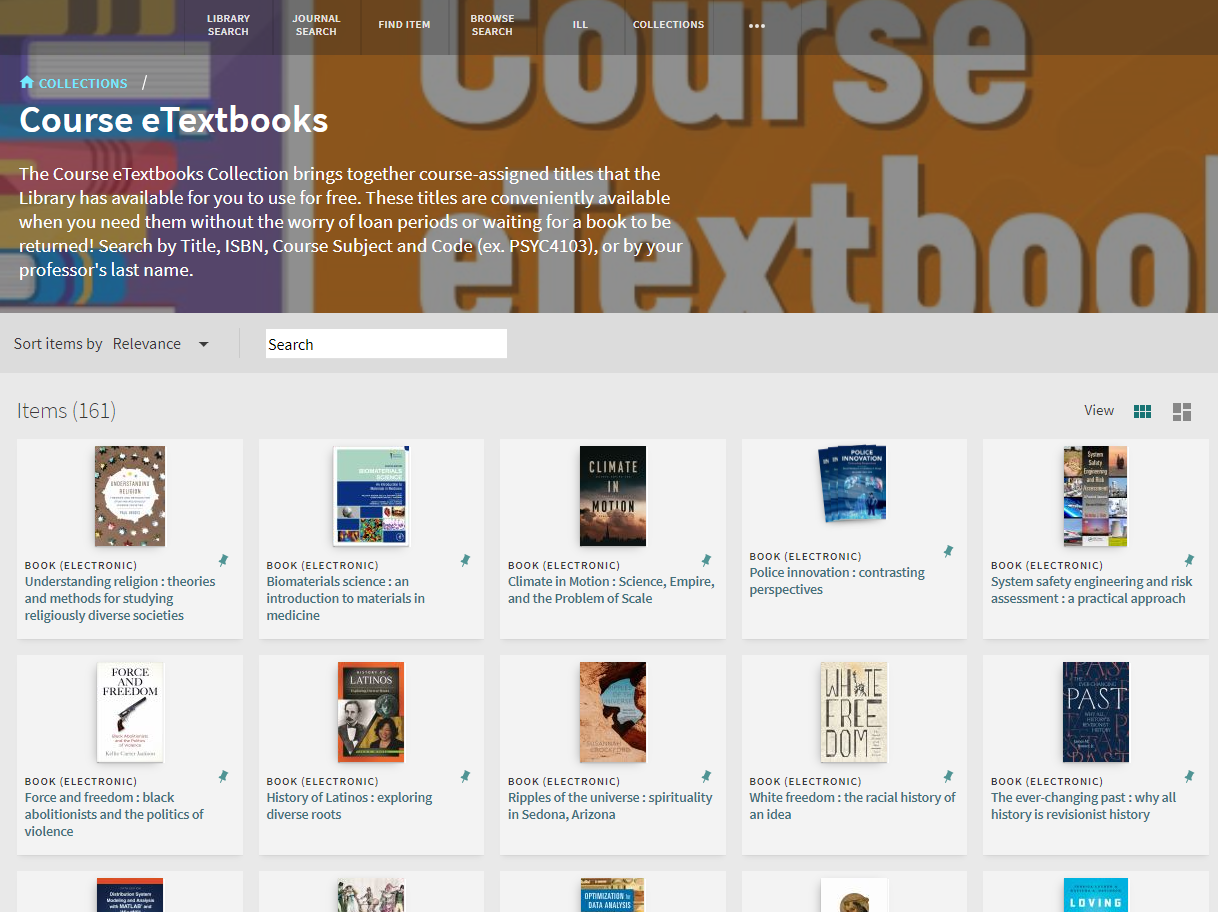
Get ready for the upcoming semester by checking out our Course eTextbooks collection! This collection holds electronic versions of course-assigned texts that you can access through the library for free. Just like all of our other electronic books, these eTextbooks don’t have any loan periods and multiple people can access them at same time – there are no waitlists and you can access these books anytime, anywhere!


The course etextbooks collection in the library catalog


You can search this collection by Title, ISBN, Instructor’s Last Name, and Course Subject & Code (ex. HONR3700). 

If you want to learn more about eTextbooks and Course Reserves, take a look at our Textbook Affordability Student Resources page where you can search for electronic and print course materials, learn more about Niner Course Pack, and more.